Tuning
The process of adapting a model to a new domain or set of custom use cases by training the model on new data
Fine Tuning
Large language model (LLM) fine-tuning is the process of taking pre-trained models and further training them on smaller, specific datasets to refine their capabilities and improve performance in a particular task or domain. Fine-tuning is about turning general-purpose models and turning them into specialized models. It bridges the gap between generic pre-trained models and the unique requirements of specific applications, ensuring that the language model aligns closely with human expectations.
LoRA
- Introduce two low-rank matrices, A and B, to work alongside the weight matrix W.
- Adjust these matrices instead of the behemoth W, making updates manageable.
LoRA-FA (Frozen-A)
- Takes LoRA a step further by freezing matrix A.
- Only matrix B is tweaked, reducing the activation memory needed.
VeRA
- All about efficiency: matrices A and B are fixed and shared across all layers.
- Focuses on tiny, trainable scaling vectors in each layer, making it super memory-friendly.
Delta-LoRA
- A twist on LoRA: adds the difference (delta) between products of matrices A and B across training steps to the main weight matrix W.
- Offers a dynamic yet controlled approach to parameter updates.
LoRA+
- An optimized variant of LoRA where matrix B gets a higher learning rate. This tweak leads to faster and more effective learning.
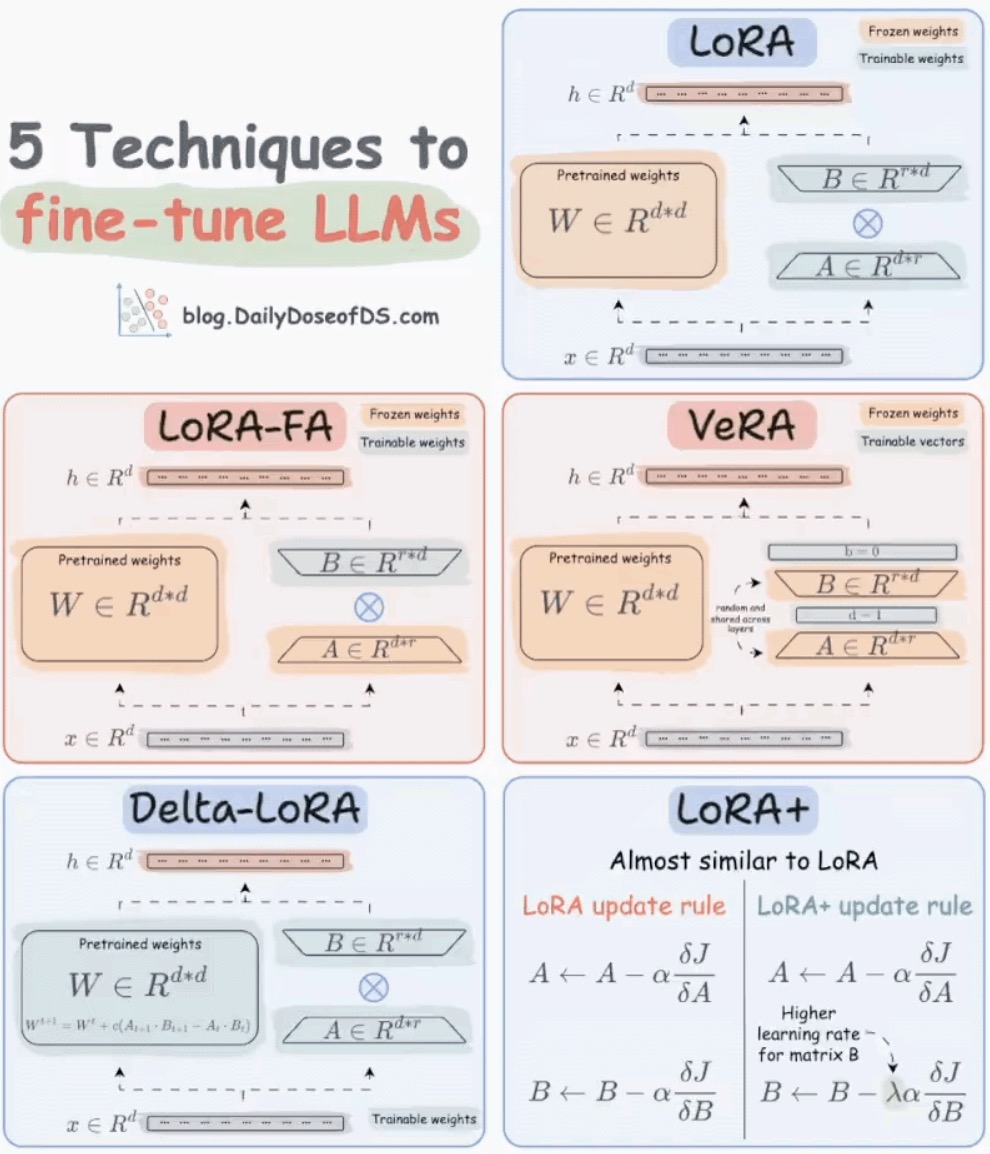
Top 4 LLM Fine-tuning Frameworks! - by Avi Chawla
Understanding LoRA-derived Techniques for Optimal LLM Fine-tuning
Supervised fine-tuning (SFT)
Supervised fine-tuning means updating a pre-trained language model using labeled data to do a specific task. The data used has been checked earlier. This is different from unsupervised methods, where data isn't checked. Usually, the initial training of the language model is unsupervised, but fine-tuning is supervised.
Methods for fine-tuning LLMs
- Instruction fine-tuning
- Full fine-tuning
- Parameter-efficient fine-tuning (PEFT)
Performance Optimization
GitHub - microsoft/BitNet: Official inference framework for 1-bit LLMs ⭐ 39k
bitnet.cpp is the official inference framework for 1-bit LLMs (e.g., BitNet b1.58). It offers a suite of optimized kernels, that support fast and lossless inference of 1.58-bit models on CPU (with NPU and GPU support coming next).
The first release of bitnet.cpp is to support inference on CPUs. bitnet.cpp achieves speedups of 1.37x to 5.07x on ARM CPUs, with larger models experiencing greater performance gains. Additionally, it reduces energy consumption by 55.4% to 70.0%, further boosting overall efficiency. On x86 CPUs, speedups range from 2.37x to 6.17x with energy reductions between 71.9% to 82.2%. Furthermore, bitnet.cpp can run a 100B BitNet b1.58 model on a single CPU, achieving speeds comparable to human reading (5-7 tokens per second), significantly enhancing the potential for running LLMs on local devices.
- BitNet - Inference framework for 1-bit LLMs : r/LocalLLaMA
- Bitnet.cpp an opensource LLM platform by Microsoft | by Kldurga | Medium
- bitnet.cpp from Microsoft: Run LLMs locally on CPU! (hands-on) - YouTube
- [2504.12285] BitNet b1.58 2B4T Technical Report
Others
- Instruct tuning / Instruction Tuning
- GitHub - ggml-org/ggml: Tensor library for machine learning ⭐ 15k
- GGUF - GPT-Generated Unified Format
- ggml/docs/gguf.md at master · ggml-org/ggml · GitHub ⭐ 15k
- GGUF - A binary format that is optimized for quick loading and saving of models, making it highly efficient for inference purposes. Developed by the
llama.cppteam, it is the industry standard for running AI models locally on consumer hardware like laptops and mobile devices.
Quantization - GGUF
Q4_K_M is a K-Quant method, a smart, mixed-precision compression technique developed by the llama.cpp team. Instead of crushing every single parameter down to 4 bits uniformly, K-Quants identify which layers are highly sensitive and keep them at a higher precision while aggressively compressing the less important layers.
The GGUF naming convention acts as a code: Q[Target Bits] _ [Algorithm] _ [Size Suffix].
Deciphering the K-Quant Suffixes (S, M, L)
When looking at 4-bit or 5-bit classes, you will typically see three options that dictate the trade-off between file size and model accuracy:
_S(Small): Compresses nearly everything down to the target bit depth. It yields the smallest file size and fastest speeds but suffers from the highest quality loss in its class._M(Medium): The gold standard for local AI. It selectively protects critical layers (like the attention mechanism's value projections and final layers) using 5-bit or 6-bit precision while keeping standard layers at 4 bits. This recovers most of the brainpower lost to compression._L(Large): Retains even more layers at a higher bit depth. It results in a larger file size, but the actual quality improvement over_Mis usually unnoticeable.
Head-to-Head GGUF Compression Comparison
The following data outlines how the most popular GGUF types perform on a typical 8 Billion parameter model (assuming the baseline unquantized FP16 version is ~16 GB):
| GGUF Quant Type | Effective Bits/Weight | Approx. File Size | Perplexity Increase (Quality Loss) | Best For |
|---|---|---|---|---|
| IQ4_NL / IQ4_XS | ~4.0 bits | ~4.3 GB | Low-Medium | Squeezing every megabyte out of tight VRAM. |
| Q4_K_S | ~4.2 bits | ~4.5 GB | Medium | Old or slow hardware where speed is top priority. |
| Q4_K_M | ~4.5 bits | ~4.8 GB | Very Low | The default recommendation for balance. |
| Q5_K_S | ~5.3 bits | ~5.5 GB | Negligible | Getting high quality when Q5_K_M is slightly too big. |
| Q5_K_M | ~5.5 bits | ~5.7 GB | Near Zero | Small models (<8B) where precision matters. |
| Q8_0 | ~8.5 bits | ~8.5 GB | Virtually None | PCs with large amounts of RAM/VRAM. |
The Two Golden Rules of GGUF Selection
- Model Size Dictates the Impact: The larger the model's base parameters, the more resilient it is to compression. A massive 70B model quantized to
Q4_K_Mwill retain almost 99% of its original capabilities. However, a smaller 7B or 8B model has less redundancy and will show a noticeable drop in coding and logic at 4 bits; chooseQ5_K_Mor higher for small models if your hardware allows. - Beware of the "Zip" Effect: You might assume a 2-bit or 3-bit model (
Q2_KorQ3_K_M) will run significantly faster because the file is smaller. In reality, extreme compression requires the CPU/GPU to perform complex math to "dequantize" the weights back into a readable state during text generation. This computation bottleneck means 2-bit models are often slower than 4-bit models while being much less coherent.
Links
- Fine-tuning large language models (LLMs) in 2024 | SuperAnnotate
- Pruning Aware Training(PAT) in LLMs - by Bugra Akyildiz
- Generative AI Fine Tuning LLM Models Crash Course - YouTube
- KV Caching in LLMs, explained visually
- Inside CALM: Google DeepMind’s Unique Method to Augment LLMs with Other LLMs | by Jesus Rodriguez | Medium
- [2408.13296v1] The Ultimate Guide to Fine-Tuning LLMs from Basics to Breakthroughs: An Exhaustive Review of Technologies, Research, Best Practices, Applied Research Challenges and Opportunities