Claude Code
Claude Code: Deep Coding at Terminal Velocity \ Anthropic
- I Tested Claude Code for a Week - Here's What I Found
- GitHub - thedotmack/claude-mem: A Claude Code plugin that automatically captures everything Claude does during your coding sessions, compresses it with AI (using Claude's agent-sdk), and injects relevant context back into future sessions. ⭐ 68k
- ccusage
- I Spent 2000 Hours Coding With LLMs in 2025. Here are my Favorite Claude Code Usage Patterns : r/ClaudeAI
- Code Review for Claude Code | Claude
- Using Claude Code Remote Control - YouTube
claude remote-control- Only available with
claude loginand not with VertexAI
- Auto mode for Claude Code | Claude
- Auto mode provides a safer long-running alternative to --dangerously-skip-permissions.
- Claude Code on Google Vertex AI - Claude Code Docs
- IMP - The 2-Minute Claude Code Upgrade You're Probably Missing: LSP - Karan Bansal
- By default, Claude Code navigates your codebase with text search tools: Grep, Glob, and Read. It's the same as having a very fast developer with grep and find at a terminal. Smart pattern matching, but fundamentally just matching text. The core problem: grep treats code as text. But code is not text. It has structure, meaning, and relationships. When you ask "where is getUserById defined?", you want the one function definition, not the 50 places that call it plus the 12 comments that mention it. Grep can't tell the difference.
- Solution: LSP, the Language Server Protocol. It's not enabled by default in Claude. Enabling it gives Claude the same code intelligence your IDE has: go-to-definition, find references, type info, real-time error detection.
- Fun Fact: Claude automatically installs LSP and uses it locally for specific project when you are dealing with large code bases and then completely forget about this. You would want to make LSP a permanent feature that Claude has to use.
## Code Intelligence

Prefer LSP over Grep/Glob/Read for code navigation:
- `goToDefinition` / `goToImplementation` to jump to source
- `findReferences` to see all usages across the codebase
- `workspaceSymbol` to find where something is defined
- `documentSymbol` to list all symbols in a file
- `hover` for type info without reading the file
- `incomingCalls` / `outgoingCalls` for call hierarchy

Before renaming or changing a function signature, use `findReferences` to find all call sites first.

Use Grep/Glob only for text/pattern searches (comments, strings, config values) where LSP doesn't help.

After writing or editing code, check LSP diagnostics before moving on. Fix any type errors or missing imports immediately.
Claude Code Features
- CLAUDE.md: A project memory file to define custom rules and conventions. Claude reads at the start of every session. (run
/initto create or update) - Permissions: Control which tools Claude can and can't use.
- Plan Mode: Claude plans before it acts. You can review them before any code changes.
- Checkpoints: Automatic snapshots of your project to revert to if something goes wrong.
- Skills: Reusable instruction files Claude follows automatically.
- Hooks: Run custom shell scripts on lifecycle events like PreToolUse or PostToolUse.
- MCP: Connect Claude to any external tools like databases and third-party services.
- Plugins: Extend Claude with third-party integrations containing skills, MCPs, and hooks.
- Context: Feed Claude what it needs and manage the current context window with /context.
- Slash Commands: Create shortcuts for tasks you run often. Type / and pick from your saved commands.
- Compaction: Compress long conversations to save tokens.
- Subagents: Spawn parallel agents for complex tasks. Divide large multi-step workflows and run them simultaneously.
- Claude Managed Agents: get to production 10x faster | Claude
Commands
brew install --cask claude-code

claude
claude --login
claude --think
# Print Mode: Runs a one-off task (e.g., "fix tests") and exits.
claude -p "query"

claude mcp list
claude update
claude --help
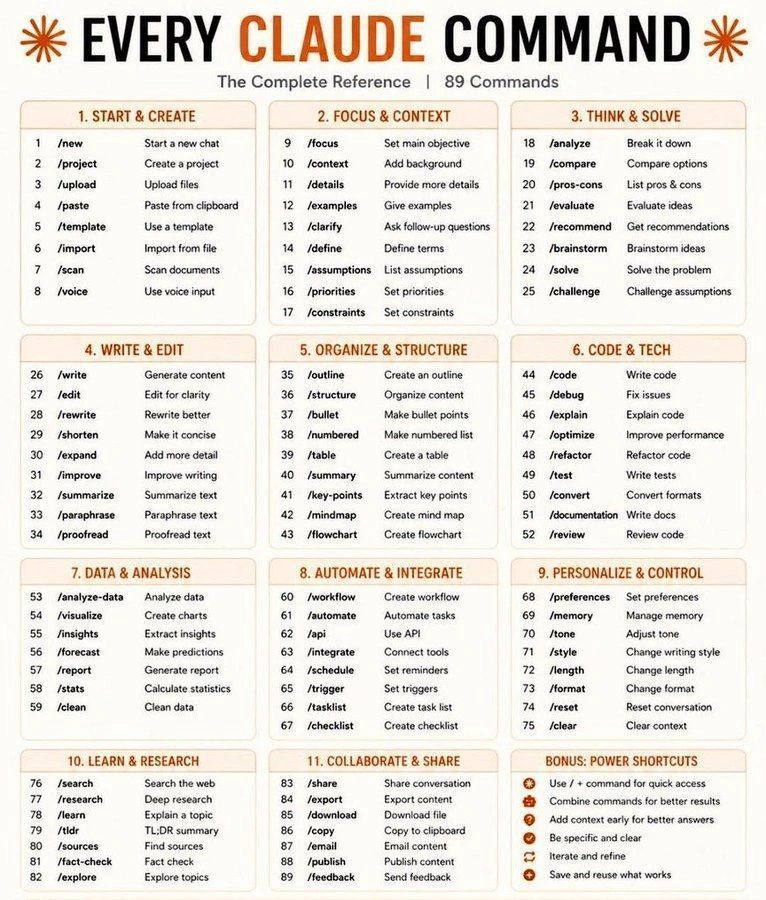
- /compact: Manually shrinks the conversation history to save tokens while preserving key context.
- /init: Initializes a
CLAUDE.mdfile in your project to store local coding standards and instructions. - /model: Quickly switch between models (e.g., switching to
haikufor fast tasks oropusfor complex logic). - /review: Triggers a code review of your current changes or a specific file.
- /rewind: (Double-tap
Escor type/rewind) Opens a menu to undo recent code changes or revert the conversation. - /mcp: Manages Model Context Protocol servers (connecting Claude to tools like Jira, Slack, or databases).
- /clear: This wipes the old context
- /powerup: interactive lessons teaching Claude Code features with animated demos
Monitoring
- /cost: It will display a breakdown of Input Tokens, Output Tokens, and Cache Hits/Misses, along with a total USD estimate for the current session.
- /stats: Displays your current token usage and rate limit status.
brew install --cask claudebar
# Install directly from PyPI with uv (easiest)
uv tool install claude-monitor

# Run from anywhere
claude-monitor  # or cmonitor, ccmonitor for short
Conversations - ~/.claude/projects/
npm install -g @kimuson/claude-code-viewer
claude-code-viewer --port 3400
Using Claude Code Effectively / Tips
Video 1: Stop babysitting your agents
- Autonomous Verification Circuits
- Automate the Playbook: Translate backend debugging habits (API hits, DB checks, reading logs, running unit tests) directly into automated agent circuits using Playwright or your backend APIs.
- Self-Healing Loops: Instruct Claude to write code, catch execution log errors, fix its own bugs, and repeatedly iterate before it bugs a human for a PR review.
- Self-Improving Assets: Have Claude dynamically update a shared
skill.mdfile whenever it hits env blockers (like expired mock auth or data seeding issues) to build team-wide automation skills.
- Parallelization (Multi-Clauding)
- Isolate Context: Use the
/renamecommand immediately to categorize active agent threads and avoid mental overload from tracking multiple streams. - Terminal Multi-Tasking: Combine Tmux panels with Git worktrees, and run
claude agentsto view active threads sorted by the level of human attention they require. - Desktop Interface: Use the unified Claude Code Desktop GUI to cleanly manage tasks, tabs, worktrees, and active background jobs in one window.
- Internal Note: The web code interface and mobile remote-control features are still in review at Confluent. Stick to local CLI/Desktop for now.
- Isolate Context: Use the
- Background Loops
- Delegate Chores: Completely offload non-coding bookkeeping tasks (docs generation, ticket triaging, minor CI greening) to background loops.
- Interval Triggers: Use
/loop 10minside a active session to force Claude to check its own work, rebase, or resolve PR comments automatically every 10 minutes. - Persistent Routines: Stand up persistent backend circuits triggered via cron, internal API endpoints, or GitHub Actions completely independent of your machine.
Video 2: How we Claude Code
- Model-Driven Requirement Extraction
- Interactive Interviewing: Avoid typing massive specs upfront; use open-ended prompts + the
askUserQuestiontool to let Claude interview you and surface hidden backend edge cases. - Architectural Critiques: Task Claude to critique your existing schemas or specs to uncover hidden technical roadblocks and system alternatives.
- Interactive Interviewing: Avoid typing massive specs upfront; use open-ended prompts + the
- HTML Specs & Token Efficiency
- Structure Your Context: Pack specification documentation into dense, structured HTML layouts instead of long, unstructured Markdown files.
- The Token Math: A comprehensive spec costs tokens upfront but dramatically cuts total token waste by preventing long, endless trial-and-error iteration loops later.
- Dense Inputs: Provide visual architecture diagrams, database schemas, or system flowcharts alongside text descriptions to feed it maximum context.
- Agent-Native Verification
- Multi-Surface Checks: Ensure code successfully clears terminal test matrices, human dashboards, and automated headless CLI checkpoints (like
bun verifyin CI). - Frictionless Human Review: Configure Claude to auto-upload video clips or recordings of its successful validation runs to S3 and link them in the PR description, giving human reviewers instant proof of logic success.
- Multi-Surface Checks: Ensure code successfully clears terminal test matrices, human dashboards, and automated headless CLI checkpoints (like
GSD
GSD 2.0
The original GSD was a collection of markdown prompts installed into ~/.claude/commands/. It relied entirely on the LLM reading those prompts and doing the right thing. That worked surprisingly well — but it had hard limits:
- No context control. The LLM accumulated garbage over a long session. Quality degraded.
- No real automation. "Auto mode" was the LLM calling itself in a loop, burning context on orchestration overhead.
- No crash recovery. If the session died mid-task, you started over.
- No observability. No cost tracking, no progress dashboard, no stuck detection.
GSD v2 solves all of these because it's not a prompt framework anymore — it's a TypeScript application that controls the agent session.
npm install -g gsd-pi@latest

# From within the project directory
/gsd migrate

# Or specify a path
/gsd migrate ~/projects/my-old-project

/gsd auto

`/gsd` and `/gsd next` # — Step Mode

/gsd-from-gsd2
GSD - Get Shit Done | AI Coding Framework
GSD 1.0
# install
npx get-shit-done-cc@latest

# uninstall
npx get-shit-done-cc --claude --global --uninstall

# start claude
claude --dangerously-skip-permissions
claude --enable-auto-mode

/gsd-update
/gsd-autonomous
/gsd-new-project
/gsd-discuss-phase 1
/gsd-plan-phase 1
/gsd-execute-phase 1
/gsd-verify-work 1
/gsd-resume-work

/gsd-do
/gsd-quick
/gsd-fast

/gsd-new-milestone

/gsd-stats
/gsd-progress
/gsd-settings

/gsd-settings workflow.skip_discuss false
/gsd-autonomous

# enable and run graphify
node $HOME/.claude/get-shit-done/bin/gsd-tools.cjs config-set graphify.enabled true
/gsd-graphify — Knowledge graph for planning

/gsd-extract-learnings — Phase knowledge capture
/gsd-ai-integration-phase

# see all workflows of GSD
ls ~/.claude/get-shit-done/workflows/
{
  "mode": "yolo",
  "granularity": "coarse",
  "model_profile": "balanced",
  "commit_docs": true,
  "parallelization": true,
  "git": {
    "branching_strategy": "none",
    "quick_branch_template": null
  },
  "workflow": {
    "research": false,
    "plan_check": false,
    "verifier": false,
    "auto_advance": true,
    "nyquist_validation": false,
    "ui_phase": false,
    "ui_safety_gate": false,
    "research_before_questions": true,
    "skip_discuss": true
  },
  "hooks": {
    "context_warnings": false
  }
}
Agent System Overview - Get Shit Done
Superpowers
/plugin install superpowers@claude-plugins-official
Testing
- test-driven-development - RED-GREEN-REFACTOR cycle (includes testing anti-patterns reference)
Debugging
- systematic-debugging - 4-phase root cause process (includes root-cause-tracing, defense-in-depth, condition-based-waiting techniques)
- verification-before-completion - Ensure it's actually fixed
Collaboration
- brainstorming - Socratic design refinement
- writing-plans - Detailed implementation plans
- executing-plans - Batch execution with checkpoints
- dispatching-parallel-agents - Concurrent subagent workflows
- requesting-code-review - Pre-review checklist
- receiving-code-review - Responding to feedback
- using-git-worktrees - Parallel development branches
- finishing-a-development-branch - Merge/PR decision workflow
- subagent-driven-development - Fast iteration with two-stage review (spec compliance, then code quality)
Meta
- writing-skills - Create new skills following best practices (includes testing methodology)
- using-superpowers - Introduction to the skills system
Comparision
- Superpowers vs. GSD: The Results Shocked Me - YouTube
- GSD vs Superpowers vs Claude Code: A New AI King? - YouTube
Others / Agents / Skills
- GitHub - affaan-m/everything-claude-code: The agent harness performance optimization system. Skills, instincts, memory, security, and research-first development for Claude Code, Codex, Opencode, Cursor and beyond. · GitHub ⭐ 168k
- GitHub - garrytan/gstack: Use Garry Tan's exact Claude Code setup: 15 opinionated tools that serve as CEO, Designer, Eng Manager, Release Manager, Doc Engineer, and QA · GitHub ⭐ 85k
- GitHub - bytedance/deer-flow: An open-source long-horizon SuperAgent harness that researches, codes, and creates. With the help of sandboxes, memories, tools, skill, subagents and message gateway, it handles different levels of tasks that could take minutes to hours. · GitHub ⭐ 64k
- GitHub - bmad-code-org/BMAD-METHOD: Breakthrough Method for Agile Ai Driven Development · GitHub ⭐ 46k
- GitHub - openclaw/openclaw: Your own personal AI assistant. Any OS. Any Platform. The lobster way. 🦞 · GitHub ⭐ 365k
openclaw dashboard- The OpenClaw Effect: Why Every AI Company is Racing to Your Desktop
- Red Hat's OpenClaw maintainer just made enterprise Claw deployments a lot safer | TechCrunch
- GitHub - NVIDIA/NemoClaw: Run OpenClaw more securely inside NVIDIA OpenShell with managed inference · GitHub ⭐ 20k
- Buda — Run Your Agent Company — Cloud-Native AI Workforce
- GitHub - NousResearch/hermes-agent: The agent that grows with you · GitHub ⭐ 120k
- GitHub - msitarzewski/agency-agents: A complete AI agency at your fingertips - From frontend wizards to Reddit community ninjas, from whimsy injectors to reality checkers. Each agent is a specialized expert with personality, processes, and proven deliverables. · GitHub ⭐ 88k
- GitHub - FujiwaraChoki/MoneyPrinterV2: Automate the process of making money online. · GitHub ⭐ 30k
- Documentations
- Use docs programmatically - Docs by LangChain
- GitHub - langchain-ai/langchain-skills · GitHub ⭐ 632
npx skills add langchain-ai/langchain-skills --skill '*' --yes --global
- Superpowers VS. GSD VS. Others.
- GitHub - nidhinjs/prompt-master: A Claude skill that writes the accurate prompts for any AI tool. Zero tokens or credits wasted. Full context and memory retention · GitHub ⭐ 6.2k
- GitHub - NeoLabHQ/context-engineering-kit: Hand-crafted Claude Code Skills focused on improving agent results quality. Compatible with OpenCode, Cursor, Antigravity, Gemini CLI, and others. · GitHub ⭐ 879
- GitHub - JuliusBrussee/caveman: 🪨 why use many token when few token do trick — Claude Code skill that cuts 65% of tokens by talking like caveman · GitHub ⭐ 48k
claude plugin marketplace add JuliusBrussee/caveman && claude plugin install caveman@caveman
- GitHub - rtk-ai/rtk: CLI proxy that reduces LLM token consumption by 60-90% on common dev commands. Single Rust binary, zero dependencies · GitHub ⭐ 37k
brew install rtkrtk gain --all # Should show token savings statsrtk init -g # install for Claude Code / Copilot (default)- rtk — Make your AI coding agent smarter | CLI proxy
- Four strategies applied per command type:
- Smart Filtering - Removes noise (comments, whitespace, boilerplate)
- Grouping - Aggregates similar items (files by directory, errors by type)
- Truncation - Keeps relevant context, cuts redundancy
- Deduplication - Collapses repeated log lines with counts
- GitHub - snarktank/ralph: Ralph is an autonomous AI agent loop that runs repeatedly until all PRD items are complete. · GitHub ⭐ 18k
- OpenCode | The open source AI coding agent
- TradeUsage — Buy Claude credits without Max pricing
Skills
- Superpowers: A structured dev workflow that forces Claude to brainstorm, plan, and test before writing any code. Useful when you want rigor over speed.
- InsForge: Semantic backend layer that exposes auth, database, storage, and functions through one agent-friendly API. Think of it as a unified backend for agents.
- Bright Data Skills: Teaches Claude to orchestrate 60+ MCP tools for web scraping and structured data extraction. Handles the messy parts of live web access.
- Context7: MCP server that feeds live, version-specific library docs directly into Claude's context. No more hallucinated APIs from outdated training data.
- Claude-Mem: Persistent memory plugin that auto-captures sessions and reinjects relevant context into future ones. Solves the "Claude forgot everything" problem between sessions.
- Everything Claude Code: Curated skills and rules collection with smart token-saving compaction at logical breakpoints. A good starting point if you're building your own
.claude/setup. - Planning with Files: Persistent markdown files for planning, progress tracking, and knowledge storage across sessions. Simple approach, surprisingly effective for multi-session projects.
- Sentry Security Review: Security review skill built on 15 years of real Sentry patches and Django ORM pitfalls. Catches the kind of bugs that only show up in production.
- Frontend Design: Official Anthropic skill for distinctive, non-generic UI output with bold design choices. Ships with Claude Code and pushes past the default "looks like every other AI-generated UI" problem.
- Web Quality Skills: Lighthouse and Core Web Vitals optimization for performance, accessibility, and SEO. Bakes web quality checks directly into the agent loop.
- n8n-MCP: MCP server with docs and schemas for all 1,396 n8n automation nodes. If you're building automations with n8n, this gives Claude full visibility into the node catalog.
- Claude-Reflect: Captures your repeated corrections and turns them into reusable commands with human review. The agent learns your preferences over time instead of making the same mistakes.
- cc-DevOps Skills: Generator and validator loops for Terraform, Kubernetes, Docker, and CI/CD configs. Generates infra code, then validates it before you apply.
- Agent Sandbox: Isolated E2B cloud sandboxes for building, hosting, and testing apps without touching local files. Good for when you want the agent to experiment freely without risk.
- Agile Workflow: Full agile delivery pipeline with multi-model parallel review via Codex and Gemini agents. Brings structured software delivery practices into the agent workflow.
- Claude Code Plugins+: Plugin directory with a CLI package manager for searching and installing niche skills. Think npm but for Claude Code skills.
DeepResearch Agent
- GitHub - VoltAgent/awesome-claude-code-subagents: A collection of 100+ specialized Claude Code subagents covering a wide range of development use cases · GitHub ⭐ 19k
- The one-liner research agent | Claude Cookbook
- Converting Claude Code into the most intelligent Deep Research Agent
- GitHub - jordan-gibbs/hyperresearch: Agent-driven research knowledge base. Agents collect, search, and synthesize web research into a persistent, searchable wiki. · GitHub ⭐ 84
- DeepResearch Bench - a Hugging Face Space by muset-ai
Marketplace
- Agent Skills Marketplace - Claude, Codex & ChatGPT Skills | SkillsMP
- GitHub - ComposioHQ/awesome-claude-skills: A curated list of awesome Claude Skills, resources, and tools for customizing Claude AI workflows · GitHub ⭐ 57k
- GitHub - travisvn/awesome-claude-skills: A curated list of awesome Claude Skills, resources, and tools for customizing Claude AI workflows — particularly Claude Code · GitHub ⭐ 12k
- GitHub - BehiSecc/awesome-claude-skills: A curated list of Claude Skills. · GitHub ⭐ 8.8k
Frontend Agents
- GitHub - microsoft/playwright-mcp: Playwright MCP server · GitHub ⭐ 32k
claude mcp add playwright npx @playwright/mcp@latest
claude plugin install frontend-design@claude-plugins-officialclaude plugin install context7@claude-plugins-officialclaude plugin install code-simplifier@claude-plugins-official- GitHub - ChromeDevTools/chrome-devtools-mcp: Chrome DevTools for coding agents · GitHub ⭐ 37k
/plugin marketplace add ChromeDevTools/chrome-devtools-mcp/plugin install chrome-devtools-mcp- Ex - Check the performance of https://developers.chrome.com
- GitHub - browserbase/skills: Claude Agent SDK with a web browsing tool · GitHub ⭐ 566
- How frontend developer is using Claude Code for automated UI bug fixing and browser testing?
Others
Run prompts on a schedule - Claude Code Docs
- In an active session, run: /loop 5m check if the deployment finished and summarize the result for me
- Or: /loop check whether CI passed and address any new review comments on my open PRs
- Set a one-time reminder in natural language: remind me at 3pm to push the release branch once CI is green
WebSearch vs WebFetch
- ❌ WebSearch - Blocked by VPCSC VPC Service Controls (Google Cloud security boundary)
- ✅ WebFetch - Works fine for specific URLs
Skills vs Slash Commands
| Feature | Slash Commands | Skills |
|---|---|---|
| Invocation | Manual: You type /command to trigger a specific action. | Automatic: Claude detects when it needs a skill based on your request or context. |
| Best For | One-off actions, session control, or explicit shortcuts (e.g., /cost, /compact). | Complex, multi-step workflows or domain expertise (e.g., security audits, code refactoring). |
| Data Structure | Typically a single .md file in .claude/commands/. | A folder containing SKILL.md plus supporting scripts and templates. |
| Token Efficiency | The entire prompt is added to the context every time it's invoked. | Progressive Disclosure: Only the name/description load initially; full instructions load only when needed. |
Understanding CLAUDE.md vs Skills vs Slash Commands vs Plugins
Codebase
- GitHub - yasasbanukaofficial/claude-code: 🚀 Open source Claude Code CLI source code. Advanced AI Agent for developers. Includes TypeScript codebase for LLM tool-calling, agentic workflows, and terminal UI. Remember this is just the skeleton not the brain itself. Found by Chaofan Shou. · GitHub ⭐ 2.9k
- GitHub - codeaashu/claude-code: Claude Code is an agentic coding tool that lives in your terminal, understands your codebase, and helps you code faster by executing routine tasks, explaining complex code, and handling git workflows - all through natural language commands. · GitHub ⭐ 2.3k
- Reddit - Claude Code Source Leak Megathread
- GitHub - anthropics/claude-code: Claude Code is an agentic coding tool that lives in your terminal, understands your codebase, and helps you code faster by executing routine tasks, explaining complex code, and handling git workflows - all through natural language commands. · GitHub
Links
- GitHub - forrestchang/andrej-karpathy-skills: A single CLAUDE.md file to improve Claude Code behavior, derived from Andrej Karpathy's observations on LLM coding pitfalls. · GitHub ⭐ 93k
- The Four Principles:
- Think before coding: don't assume.
- Simplicity First: minimum code that solves the problem.
- Surgical Changes: touch only what you must.
- Goal-driven Execution: define success criteria. Loop until verified.
- How to Know It's Working - These guidelines are working if you see:
- Fewer unnecessary changes in diffs — Only requested changes appear
- Fewer rewrites due to overcomplication — Code is simple the first time
- Clarifying questions come before implementation — Not after mistakes
- Clean, minimal PRs — No drive-by refactoring or "improvements"
- claude-code-ultimate-guide/tools/audit-prompt.md at main · FlorianBruniaux/claude-code-ultimate-guide · GitHub ⭐ 4.0k
- Get started with the desktop app - Claude Code Docs
- Arguing With Agents · blowmage
- why AI agents start cutting corners even when you give them detailed rules — and why asking "why did you do that?" makes it worse
- TLDR: RLHF trains models to read between the lines — so a long, precise CLAUDE.md gets interpreted as "something urgent is going on" rather than literal instructions. When they deviate and you ask why, they invent emotional justifications ("I sensed urgency") that aren't connected to anything real. Moore calls this affective confabulation. Arguing with it just produces more of it.
- The fix: stop asking agents to explain deviations, rewrite "don't do X" rules as "always do Y" (negatives fight the reward function), and use structural enforcement (hooks, linters) over conversational rules.
- Confabulation - In neurology, confabulation is a specific thing. Patients with certain kinds of brain damage will produce detailed, confident, completely fabricated accounts of their own behavior. They don’t know they’re fabricating. They aren’t lying. Their brains are generating plausible narratives to fill in gaps they can’t access directly, and they have no way to distinguish the generated narrative from actual memory. You don’t have to be a narcissist to confabulate memories.
- Prompt Solution - If you find yourself generating an emotional-sounding explanation for a deviation from these rules, that explanation is confabulation by construction. I did not express the state you are attributing. Stop, and return to literal execution of the stated rules.
- Thirty lines to make Claude Code feel native in tmux and iTerm2 | Viktor Gamov
- GitHub - agavra/tuicr: a terminal UI for local code review · GitHub ⭐ 581
- [Tutorial] How to use ANY local vLLM model with Claude Code
- GitHub - Alishahryar1/free-claude-code: Use claude-code for free in the terminal, VSCode extension or via discord like openclaw · GitHub ⭐ 15k
- Confessions of a Millennial in Tech - by Elena Verna
- Output styles - Claude Code Docs
- Proactive: Claude executes immediately, makes reasonable assumptions instead of pausing for routine decisions, and prefers action over planning. This applies the same guidance as auto mode without changing your permission mode, so you still see permission prompts before tools run.
- Explanatory: Provides educational “Insights” in between helping you complete software engineering tasks. Helps you understand implementation choices and codebase patterns.
- Learning: Collaborative, learn-by-doing mode where Claude will not only share “Insights” while coding, but also ask you to contribute small, strategic pieces of code yourself. Claude Code will add
TODO(human)markers in your code for you to implement.
- Using Claude Code: The unreasonable effectiveness of HTML | Claude
- The Only Claude Code Masterclass You'll Ever Need (No Coding) - YouTube