Understanding Authorization in Kafka
Authorization determines what an entity can do on a system once it has been authenticated. Consider an ATM, once you successfully authenticate with your card and PIN, you are able to access your accounts only, not all of the accounts on the machine.
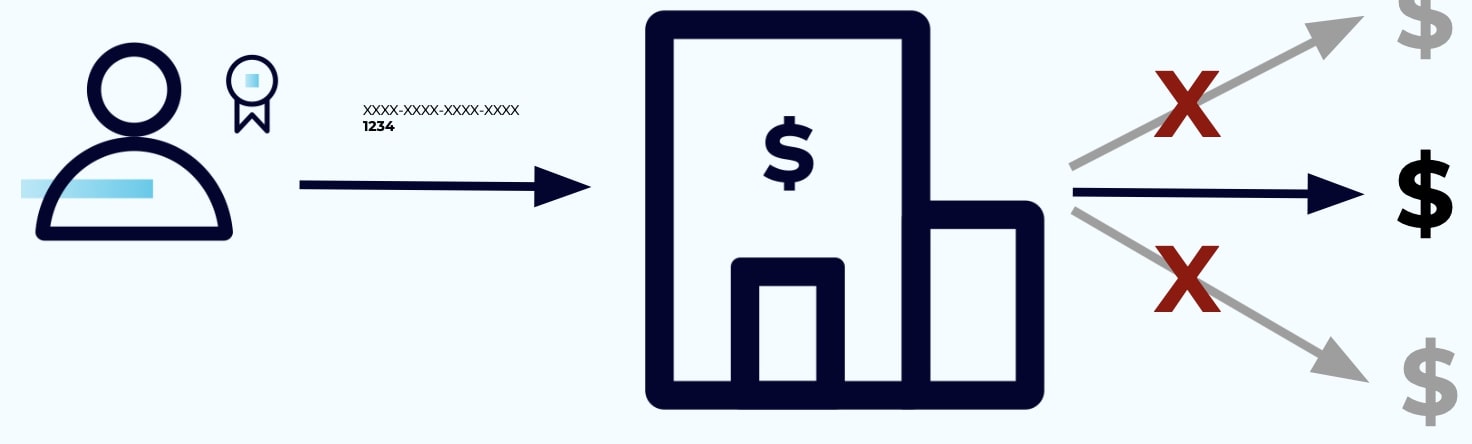
Kafka is similar: once a broker has authenticated a client's identity, it determines the actions that the client is able to execute—whether creating a topic or producing or consuming a message.
ACLs
Kafka uses access control lists (ACLs) to specify which users are allowed to perform which operations on specific resources or groups of resources. Recall that each connection is assigned a principal when it is first opened, this is what gets assigned the identity.
Each ACL contains a principal, a permission type, an operation, a resource type (e.g., cluster, topic, or group), and name:
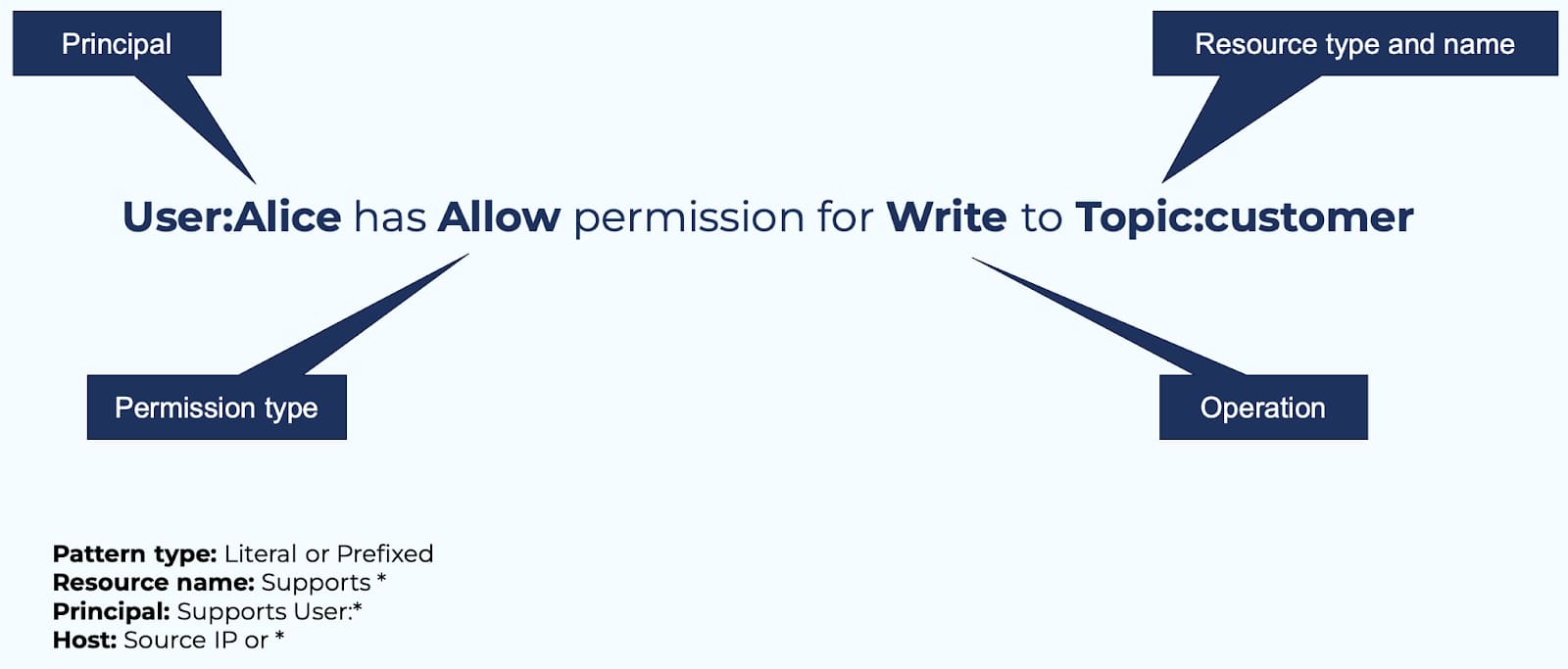
By default, resource names are treated as literals but you can also specify that they are treated as prefixes (to specify a subset of resources), or you can use a wildcard character (*) to match all resources of a specific type (which works for principals too). Finally, you can specify a host value to limit permissions to a specific IP address.
Creating ACLs
Use the kafka-acls command-line tool to create ACLs. For example, perhaps you'd like to allow users named Alice and Fred to read and write from the finance topic:
kafka-acls --bootstrap-server localhost:9092 \
  --command-config adminclient-configs.conf  \
  --add \
  --allow-principal User:alice \
  --allow-principal User:fred \
  --operation read
  --operation write \
  --topic finance
In a real use case, however, your principal names here are likely to be more complex. If you use SSL authentication for clients, for example, the principal name will use the SSL certificate's subject name. If you use SASL_SSL with Kerberos, the Kerberos principal format will be adopted. You can also configure the way that the principal is derived from the identity by configuring ssl.principal.mapping.rules for SSL and sasl.kerberos.principal.to.local.rules for Kerberos. Refer to the documentation for more details.
How Kafka Applies ACLs
ACLs created with kafka-acls are stored in ZooKeeper, then cached in memory by every broker to enable fast lookups when authorizing requests.
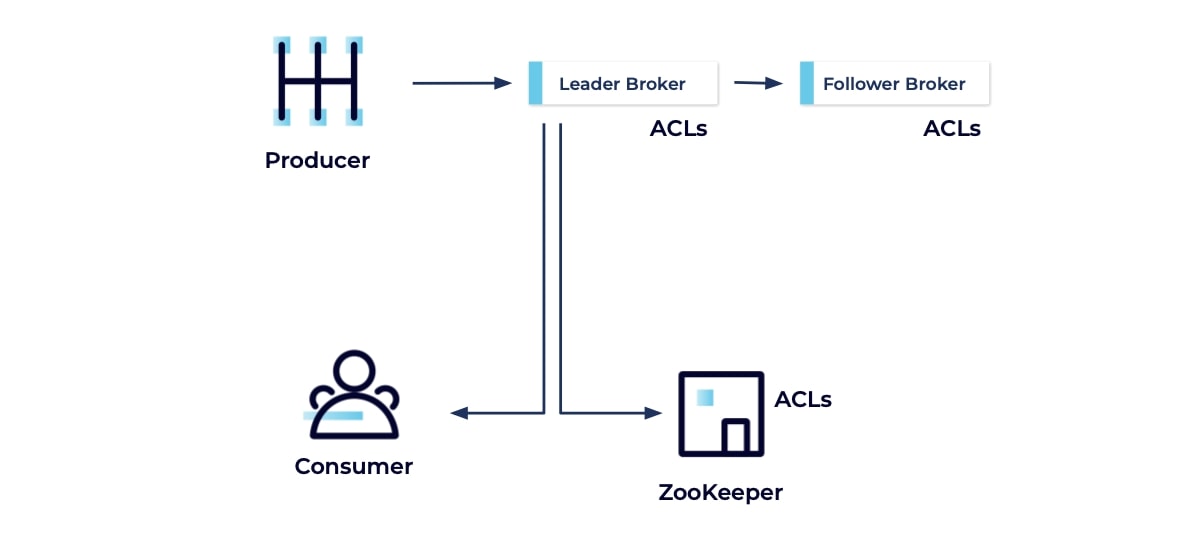
Kafka uses a server plugin known as an authorizer to apply ACLs to requests, and this can take multiple forms, even custom ones. An authorizer allows a requested action if there is at least one “Allow ACL” that matches the action, as long as there are no “Deny ACL” forbidding it (“Deny” always trumps “Allow”).
The default authorizer (for ZooKeeper Kafka) is AclAuthorizer, which you specify in each broker's configuration: authorizer.class.name=kafka.security.authorizer.AclAuthorizer. However, if you are using Kafka's native consensus implementation based on KRaft then you'll use a new built-in StandardAuthorizer that doesn't depend on ZooKeeper. StandardAuthorizer accomplishes all of the same things that AclAuthorizer does for ZooKeeper-dependent clusters, and it stores its ACLs in the __cluster_metadata metadata topic.
Customizing Access Control
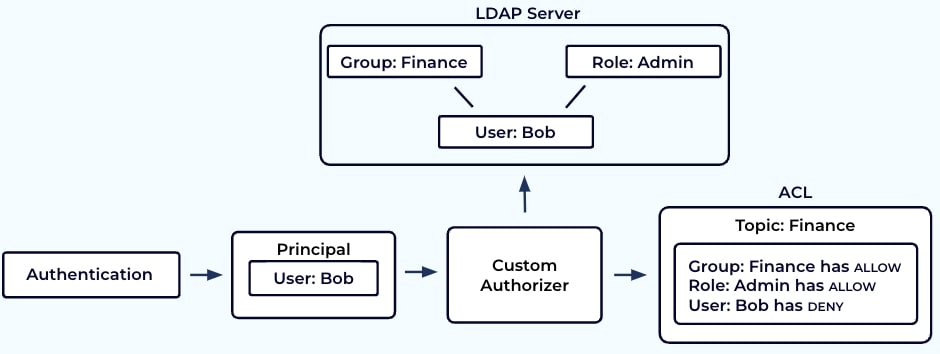
If you work in a large organization or have a large cluster topology, you might find it inefficient to specify ACLs for each individual user principal. Instead, you might wish to assign users to groups or differentiate them based on roles. You can accomplish this with Kafka, but you will need to do several things: you'll need an external system that allows you to associate individuals with roles and/or groups, something like an LDAP store; you'll need to apply ACLs to resources based not only on users but also on roles and groups; finally, you'll need to implement a custom authorizer that can call your external system to find the roles and groups for a given principal.
Considerations
-
No matter which type of authorizer you use, whether default or custom, you should clearly distinguish between user and service accounts. You might be inclined to reuse a person’s user details to authenticate a service or application to Kafka but you shouldn't do this as people often change teams or roles (or even leave companies altogether).
-
Keep in mind that ACLs require careful management. If you are working in a development or test environment, it may be tempting to use anonymous principles, or Kafka's notion of the superuser, or its
allow.everyone.if.no.acl.foundsetting. But it’s easy to accidentally promote these settings to a production environment so it’s far better to develop good habits; from the outset, you should automatically assign proper credentials and set ACLs strictly according to need. -
If a user is compromised, you will need to remove that user from the system as soon as possible, but you will also need to check for any existing connections associated with that user since a principal is assigned to a resource upon connection. (You can set how often users need to reconnect with
connections.max.reauth.msbut you should be careful not to frustrate your users with too frequent reconnections.) Note that if a connection persists for a long time, removing a user will only take effect when the connection is closed and reconnection is attempted. Thus the best solution for blocking access to a compromised user is to implement a “Deny ACL” to prevent actions on any existing connections since ACLs get propagated quickly and are checked with every request.
Troubleshooting
For troubleshooting authorization failures in KRaft clusters with RBAC and mTLS, see KRaft + RBAC + mTLS + LDAP Troubleshooting.