VPC/VNet Peering – Overview
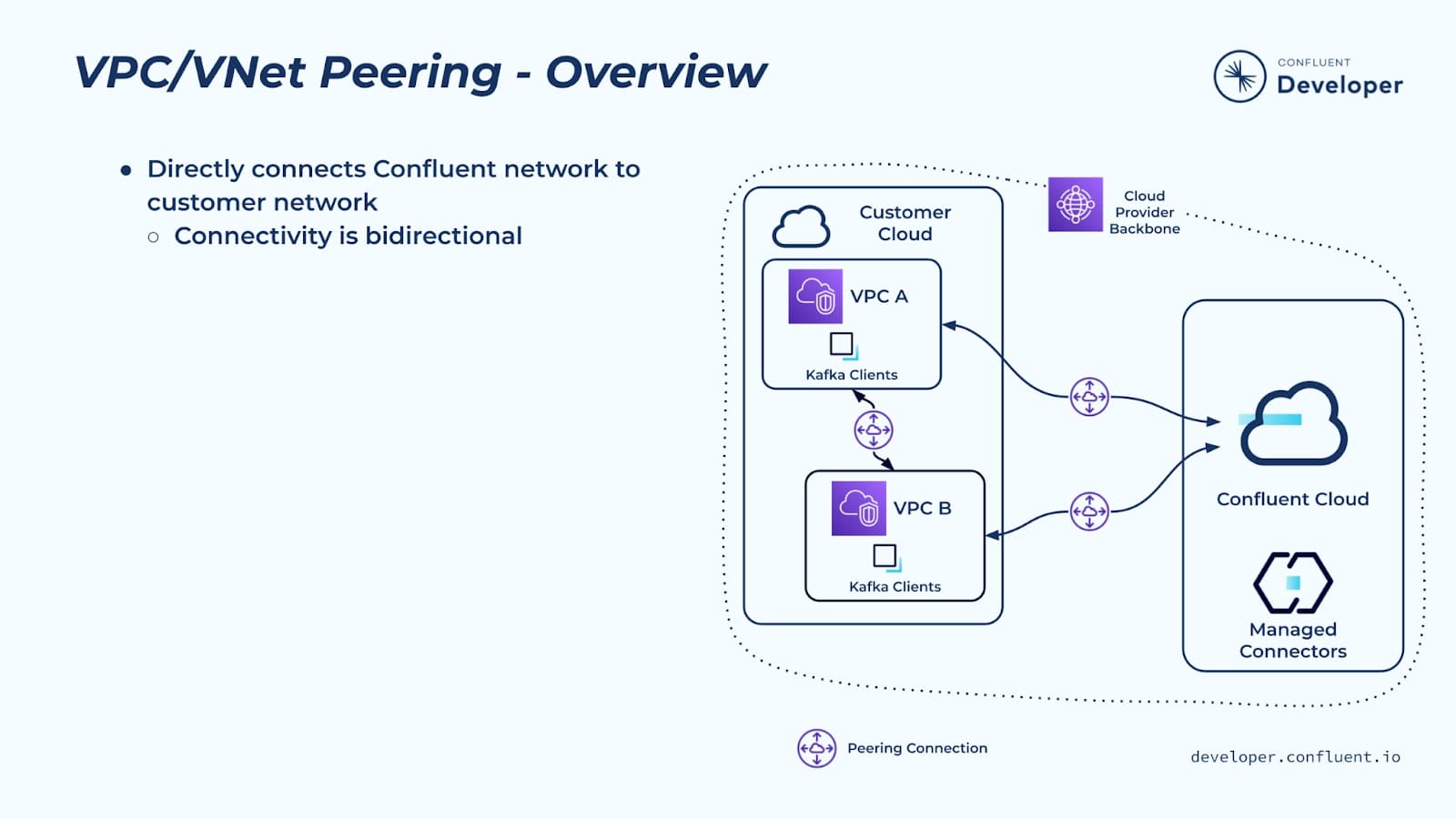
The first private networking option for Confluent Cloud is a peering connection. All of the public cloud providers—AWS, Google, and Azure—allow you to create peer connections between VPCs or VNets.
In Confluent Cloud, you provision a peering network using the Confluent Cloud console, admin API, or Terraform. You peer this Confluent network with your VPC or VNet. This is a standard cloud peering connection between Confluent and you, and it supports bidirectional connectivity, which means clients running in the peered VPC or VNet can access Confluent Cloud, and fully managed connectors running in Confluent Cloud can access data sources and sinks in your network.
Peering connectivity is a common pattern in cloud networking—it sets up a direct network connection between your network and the Confluent Cloud network. You tell Confluent what CIDR range you want us to use—it has to be a /16—and we provision the network. In the Confluent network, you can provision one or more Confluent clusters, which can all be accessed over the peering connection.
VPC/VNet Peering – Requirements
There are three main requirements in order for Confluent Cloud peering to work.
- The first is a bidirectional connection—your network or infosec team must be okay with this.
- We will never reach out to your infrastructure unless you configure a managed connector to access a data source or sink that’s running in your environment.
- The second requirement is a non-overlapping /16 CIDR range for each Confluent Cloud network.
- This CIDR range should come from one of these three types of IP address ranges:
- Private IP address range (RFC 1918)
- 10.0.0.0/8
- 172.16.0.0/12
- 192.168.0.0/16
- Shared address space (Carrier-grade NAT) (RFC 6598)
- 100.64.0.0/10
- Benchmark address space (RFC 2544)
- 198.18.0.0/15 (only AWS and GCP)
- Private IP address range (RFC 1918)
- There’s also a set of address ranges that are explicitly excluded for use:
- 10.100.0.0/16
- 10.255.0.0/16
- 172.17.0.0/16
- 172.20.0.0/16
- This CIDR range should come from one of these three types of IP address ranges:
- The third requirement is that your DNS servers must be able to access the authoritative DNS servers for confluent.cloud, which are hosted by Confluent on the internet.
VPC/VNet Peering – Benefits
The Confluent peering network has a number of benefits:
- It’s the most easily understood private network option, and it supports private networking entirely—traffic never needs to go over the public internet.
- You can co-locate Confluent clusters within a Confluent network—this allows you to allocate a single /16 range for multiple Confluent clusters in a single environment.
- Because Confluent has access to your network, we have the ability to access data sinks and data sources that are present in your environment. For example, if you have a database you’d like us to capture change data capture out of, we can potentially run a fully managed connector that can capture changes from your database and publish to Confluent.
VPC/VNet Peering Limitations
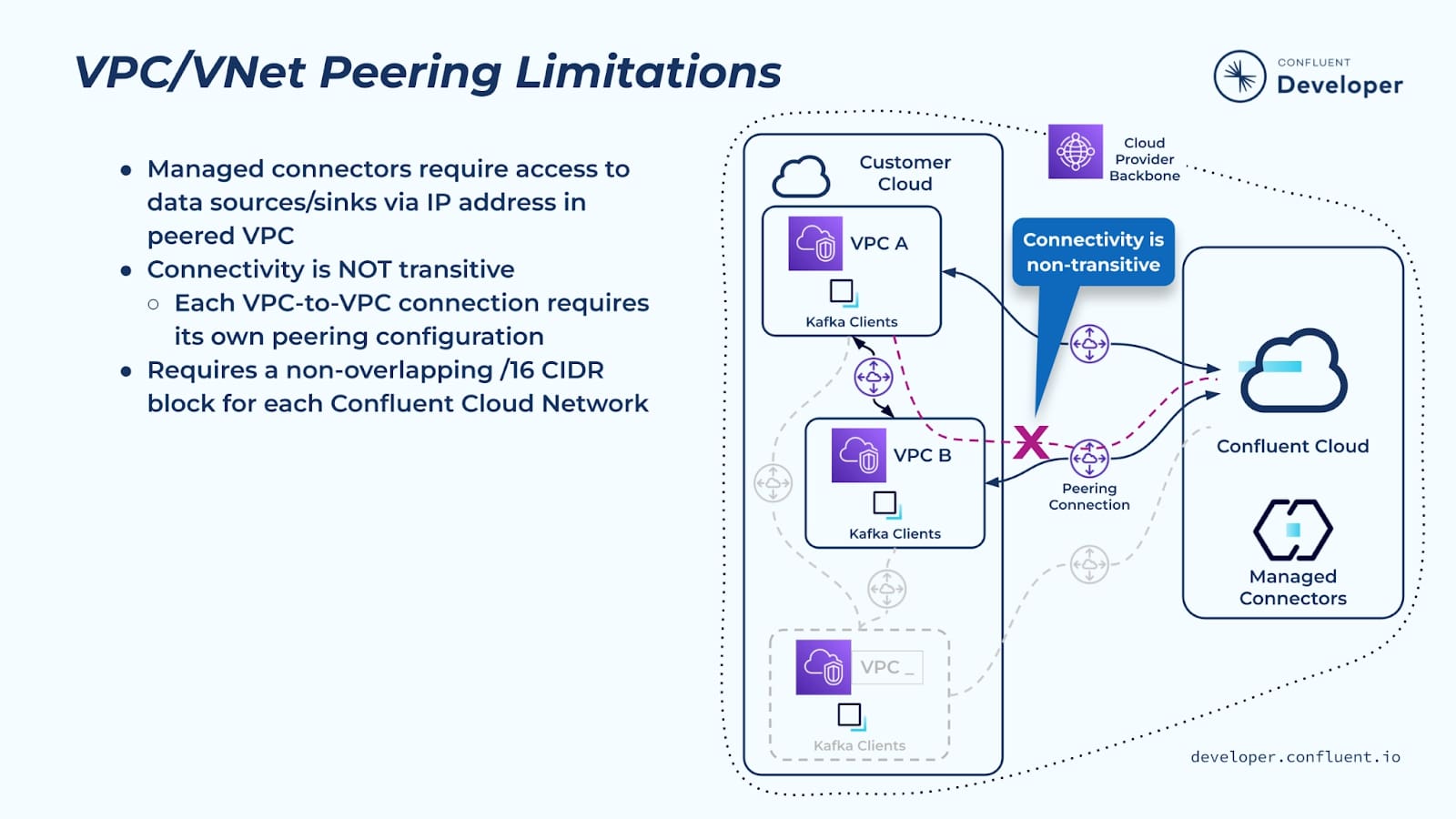
There are a number of limitations with the Confluent peering network to be aware of.
- First, Confluent Cloud managed connectors can only be used for sources/sinks that are reachable via an IP address in the VPC peered with Confluent Cloud.
- Two other limitations relate to cloud networking—in general cloud networks don’t support transitive network connectivity.
- If you want to access a Confluent network from a VPC or VNet, it has to be directly peered to the Confluent network. There are a few exceptions to this that we will discuss shortly, but generally speaking you can’t transit through one VPC or VNet to get to another one.
- Related to the general lack of transitive network connectivity in the cloud, it’s hard to connect on-premises (datacenter-hosted) services to Confluent Cloud. That is, you can’t connect from an on-premises network to one of your VPCs in the public cloud, and from there to the Confluent Cloud network. VPC peering is really intended to allow private networking between VPCs/VNets and Confluent Cloud within the same region.
- Both of these scenarios have workarounds that will be discussed on the next slide.
- Another limitation to mention is the non-overlapping /16 CIDR range requirement that was mentioned earlier.
Google Cloud VPC Peering
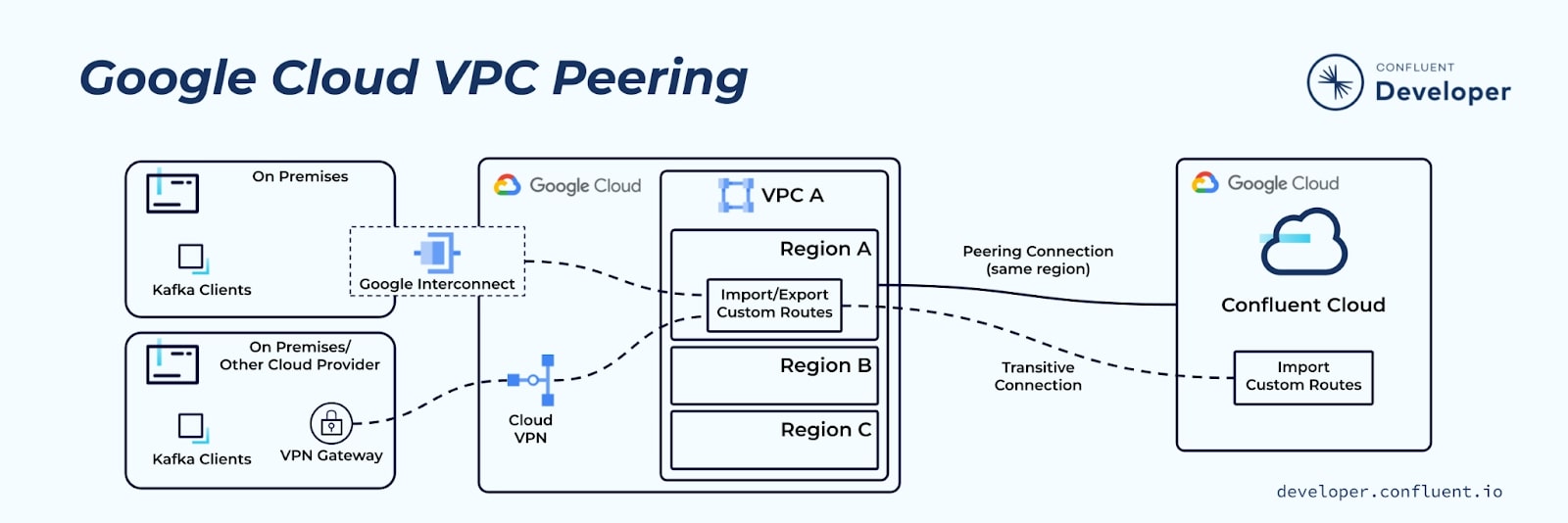
Google Cloud treats VPC peering a bit differently than AWS and Azure in two ways:
- Regional boundary
- Unlike AWS VPCs and Azure VNets, which are regional, Google VPCs are global and can span multiple regions. Despite this, even if a GCP Confluent Cloud network is peered to a global GCP VPC, only services in the same region as the cluster can access the Confluent Cloud cluster.
- Peering
- An exception to the “no transitive connections” rule is Google's custom route import/export feature. Google Cloud Peering offers transitive connectivity for VPN or Google Interconnect to on-premises or other cloud provider networks to reach Confluent Cloud using this feature.
- To enable this option, select it when you create the peering connection in Confluent Cloud.
- This option can not provide transitive connectivity to Confluent Cloud from one Google Cloud VPC through another Google Cloud VPC.
- An exception to the “no transitive connections” rule is Google's custom route import/export feature. Google Cloud Peering offers transitive connectivity for VPN or Google Interconnect to on-premises or other cloud provider networks to reach Confluent Cloud using this feature.
Other Caveats
Azure
- Azure provides a capability called “Gateway Transit,” which allows a VNet to access a VPN or ExpressRoute gateway in a peered VNet. For example, if you have VNet X peered to VNet Y, and VNet Y has a ExpressRoute connecting it to your datacenter, Gateway Transit allows VNet X to access the datacenter through the ExpressRoute in VNet Y.
- This capability is not currently supported on Confluent Cloud.
Hands-on
- Configure a VPC Peered Cluster (Hands-On Tutorial)
- AWS
- PrivateLink
- Transit Gateway
- VPC Peering
- Three CIDR ranges, one for each availability zone, each matching the subnet mask of
255.255.255.224/27 - (Legacy) A single CIDR range matching the subnet mask of
255.255.0.0/16
- Three CIDR ranges, one for each availability zone, each matching the subnet mask of
- Google Cloud
- Private Service Connect
- VPC Peering
- Microsoft Azure
- Private Link
- VNet Peering
- DNS configuration - Private DNS Resolution
Use AWS VPC Peering with Confluent Cloud
AWS VPC peering enables you to route traffic using private IPv4 addresses between your AWS virtual private cloud (VPC) and Confluent Cloud. Your VPC can communicate with Confluent Cloud as if they are within the same network.
The following features are supported when you set up a VPC peering connection between AWS VPC and Confluent Cloud:
- Managed connectors created in a VPC-peered cluster can access data sources and sinks hosted in all peered VPCs, if the firewall rules allow connector traffic to and from the peered VPCs.
- Fetch from Follower is a cost optimization feature that allows clients to consume from the nearest follower, instead of the leader.
The high-level workflow to set up a VPC peering connection to Confluent Cloud:
- Identify a Confluent Cloud network you want to use, or set up a new Confluent Cloud network.
- In Confluent Cloud, create a VPC peering connection.
- In AWS, accept the peering request.
- In AWS, add the new connection to the route table.
- To support outbound connections from Confluent Cloud, set up DNS forwarding in Confluent Cloud.
Requirements and considerations
-
A Confluent Cloud network of the “VPC Peering” type and the “AWS” provider.
Pay special attention that the CIDR blocks you select satisfy the requirements described in Confluent Cloud network CIDR blocks and block size for peering and Transit Gateway.
-
All AWS availability zones, except
use1-az3in theus-east-1region, are supported. -
Transitive VPC peering is not supported.
If you peer Network A to Network B, and peer Network B to Confluent Cloud, applications running in Network A will not be able to access Confluent Cloud. Although they don’t provide transitive routing, shared AWS VPCs can be leveraged to enable Confluent Cloud connectivity. For more information, see AWS Working with Shared VPCs.
To achieve transitivity, you can link an AWS Transit Gateway to a Confluent Cloud cluster in AWS.
-
You can have multiple VPC peering connections. For information about limits, see Network quotas in Confluent Cloud.
-
You can colocate multiple Confluent Cloud Dedicated clusters in the same Confluent Cloud network, but this is limited by the expected number and size of the clusters. The applicable limits are specified in Networks.
-
Cross-region peering is not supported through the Confluent Cloud Console. Contact Confluent Support to see if your regions are supported and to request configuration.
-
You might need to increase your route quota when you use VPC peering because the Confluent Cloud and AWS routes are shared.
-
If you have custom DNS, your DNS servers must be able to access the authoritative DNS servers for Confluent Cloud, which are hosted by Confluent on the internet.
-
Access to Confluent Cloud serverless products
Connections established for use with Dedicated Kafka clusters may also be used to connect to some serverless products. For service-specific information, see:
Use VPC peering connections with Confluent Cloud on AWS | Confluent Documentation
Create Confluent Cloud Network on AWS
Each Confluent Cloud network is a virtual network that is provisioned in your Confluent Cloud AWS account.
This network allows inbound connections from the connected network to services in Confluent Cloud. It also allows inbound connections from services in Confluent Cloud that are configured to interact with data in the Confluent Cloud network.
Confluent Cloud network CIDR blocks and block size for peering and Transit Gateway
When you set up a Confluent Cloud network for VPC peering or Transit Gateway, the CIDR blocks you specify must meet the follow requirements.
-
Specify Confluent Cloud network CIDR blocks in one of the following private IP ranges:
-
Private IP address range (RFC 1918):
10.0.0.0/8,172.16.0.0/12,192.168.0.0/16 -
Shared address space (Carrier-grade NAT) (RFC 6598):
100.64.0.0/10 -
Benchmark address space (RFC 2544):
198.18.0.0/15This CIDR block is incompatible with Transit Gateway-to-Transit Gateway Cluster Linking.
-
-
Do not select CIDR blocks that overlap with the following CIDR blocks that are reserved by Confluent Cloud:
10.100.0.0/16,10.255.0.0/16,172.17.0.0/16,172.20.0.0/16,172.31.0.0/16You cannot use the above CIDRs for peering or Transit Gateways due to routing conflicts with Confluent services. For example, managed connectors cannot reach the sources or sinks in those IP ranges.
-
The CIDR block must comply with the IPv4 CIDR block association restrictions for restricted VPC CIDR block associations.
For example, if any one of the /27 CIDR is from the
10.0.0.0/15range, the other two /27 CIDRs cannot be from10.0.0.0/16,172.16.0.0/12, or192.168.0.0/16. -
When a /16 CIDR range is provided, the range is broken up into 3 predictable /27 ranges in Confluent Cloud.
Specifically, from a given /16, the first range starts at the
0IP, the second range starts at the32, and the third at the64.For example, if you provide
10.1.0.0/16, the ranges are:10.1.0.0/27,10.1.0.32/27,10.1.0.64/27 -
10.0.0.0/16CIDR block is not supported in Confluent Cloud when you use a /16 CIDR range. -
The CIDR of the AWS VPC you want to peer with Confluent Cloud network should not be identical and not completely within the Confluent Cloud network CIDRs.
Create a Confluent Cloud network on AWS | Confluent Documentation