Confluent for Kubernetes Overview
Confluent for Kubernetes (CFK) is a cloud-native management control plane for deploying and managing Confluent in your Kubernetes private cloud environment. It provides a standard and simple interface to customize, deploy, and manage Confluent Platform through declarative API.
CFK is a Kubernetes Deployment whose lifecycle is managed by Helm, but all the various Confluent components have their custom resource definitions (CRDs) that can be managed just like any other Kubernetes resource.
CFK actively monitors the custom resources to ensure their state matches the desired state.
The following shows the high-level architecture of CFK and Confluent Platform in Kubernetes. Note that CFK also supports Confluent REST Proxy that is not shown in the diagram.
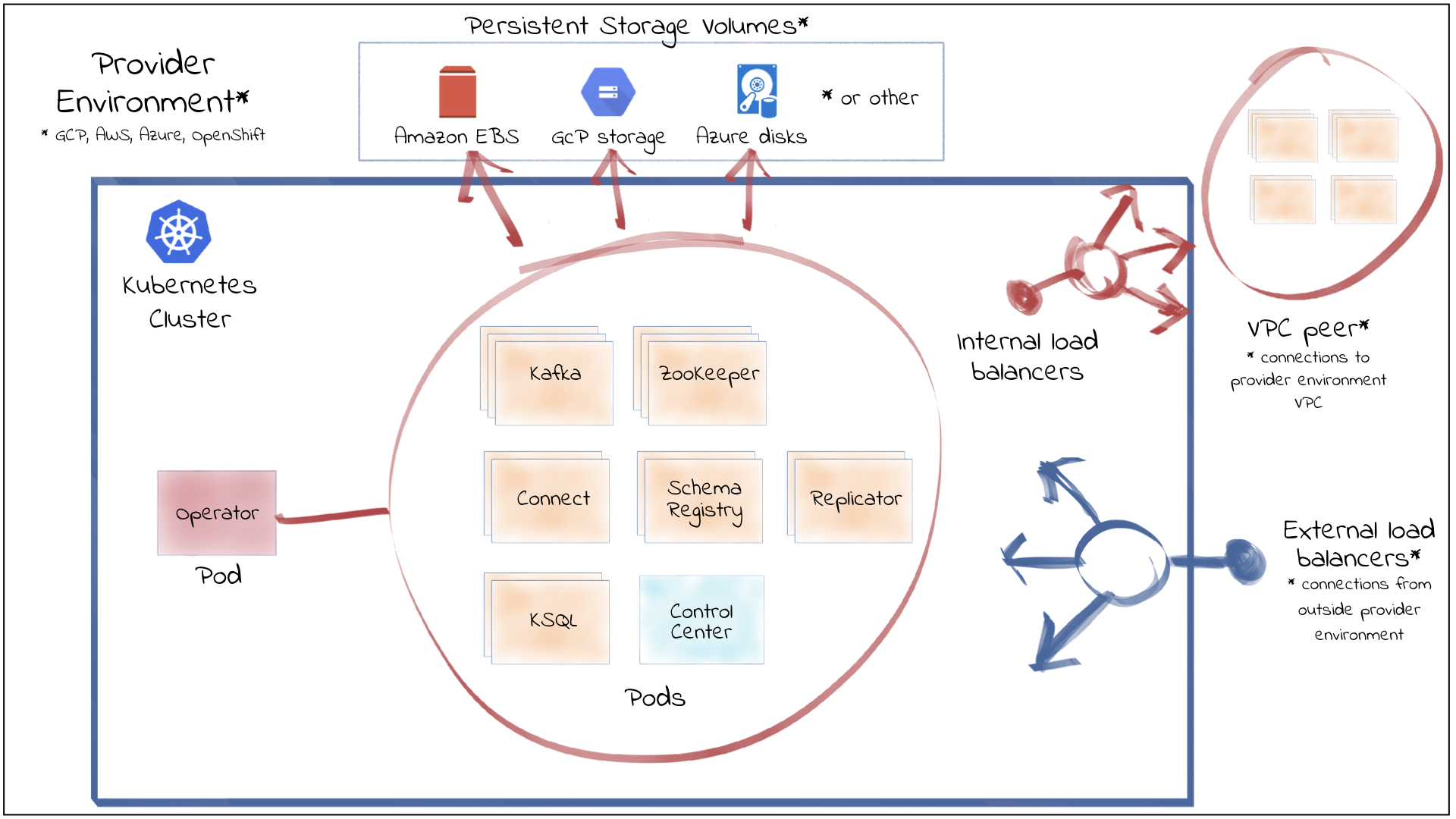
Features
The following are summaries of the main, notable features of CFK.
Cloud Native Declarative API
- Declarative Kubernetes-native API approach to configure, deploy, and manage Confluent Platform components (namely Apache Kafka®, Connect workers, ksqlDB, Schema Registry, Confluent Control Center, Confluent REST Proxy) and application resources (such as topics, rolebindings) through Infrastructure as Code (IaC).
- Provides built-in automation for cloud-native security best practices:
- Complete granular RBAC, authentication and TLS network encryption
- Auto-generated certificates
- Support for credential management systems, such as HashiCorp Vault, to inject sensitive configurations in memory to Confluent deployments
- Provides server properties, JVM, Log4j, and Log4j 2 configuration overrides for customization of all Confluent Platform components.
Upgrades
- Provides automated rolling updates for configuration changes.
- Provides automated rolling upgrades with no impact to Kafka availability.
Scaling
- Provides single command, automated scaling and reliability checks of Confluent Platform.
Resiliency
- Restores a Kafka pod with the same Kafka broker ID, configuration, and persistent storage volumes if a failure occurs.
- Provides automated rack awareness to spread replicas of a partition across different racks (or zones), improving availability of Kafka brokers and limiting the risk of data loss.
Scheduling
- Supports Kubernetes labels and annotations to provide useful context to DevOps teams and ecosystem tooling.
- Supports Kubernetes tolerations and pod/node affinity for efficient resource utilization and pod placement.
Monitoring
- Supports metrics aggregation using JMX/Jolokia.
- Supports aggregated metrics export to Prometheus.
Quickstart
Confluent for Kubernetes Quick Start | Confluent Documentation
export TUTORIAL_HOME="https://raw.githubusercontent.com/confluentinc/confluent-kubernetes-examples/master/quickstart-deploy/kraft-quickstart"

kubectl create namespace confluent
kubectl config set-context --current --namespace confluent

brew install helm
helm repo add confluentinc https://packages.confluent.io/helm
helm repo update

helm upgrade --install confluent-operator confluentinc/confluent-for-kubernetes

# Deploy the KRaft controller and the Kafka brokers:
kubectl apply -f $TUTORIAL_HOME/confluent-platform-c3++.yaml

# Install the sample producer app and topic:
kubectl apply -f $TUTORIAL_HOME/producer-app-data.yaml

# Set up port forwarding to Control Center web UI from your local machine:
kubectl port-forward controlcenter-0 9021:9021
# http://localhost:9021

# Delete
kubectl delete -f $TUTORIAL_HOME/producer-app-data.yaml
kubectl delete -f $TUTORIAL_HOME/confluent-platform-c3++.yaml
helm uninstall confluent-operator
kubectl delete namespace confluent
Bonus: Install and use Confluent kubectl plugin
curl -O https://packages.confluent.io/bundle/cfk/confluent-for-kubernetes-3.1.1.tar.gz

# unarchive and for macos, move kubectl-confluent to /usr/local/bin
tar -xvf kubectl-plugin/kubectl-confluent-darwin-arm64.tar.gz -C /usr/local/bin/

kubectl confluent dashboard controlcenter

kubectl confluent version
Flink
You must install the Confluent Platform for Apache Flink Kubernetes operator before you install CMF because CMF uses the operator to manage the Flink clusters.
Confluent Manager for Apache Flink (CMF)
# Install the certificate manager
kubectl create -f https://github.com/jetstack/cert-manager/releases/download/v1.18.2/cert-manager.yaml

helm upgrade --install cp-flink-kubernetes-operator --version "~1.130.0" confluentinc/flink-kubernetes-operator

# Create a CMF database encryption key into a Kubernetes secret
openssl rand -out cmf.key 32
kubectl create secret generic cmf-encryption-key \
  --from-file=encryption-key=cmf.key \
  -n confluent
helm upgrade --install cmf --version "~2.1.0" \
        confluentinc/confluent-manager-for-apache-flink \
        --namespace confluent \
        --set encryption.key.kubernetesSecretName=cmf-encryption-key \
        --set encryption.key.kubernetesSecretProperty=encryption-key
How to Install Confluent Manager for Apache Flink with Helm | Confluent Documentation
Deploy Flink Jobs
kubectl port-forward svc/cmf-service 8080:80

confluent flink environment create env1 --url http://localhost:8080 --kubernetes-namespace confluent

# delete env
confluent flink environment delete env1 --url http://localhost:8080
Create the JSON application file
{
"apiVersion": "cmf.confluent.io/v1",
"kind": "FlinkApplication",
"metadata": {
   "name": "basic-example"
},
"spec": {
   "flinkConfiguration": {
      "metrics.reporter.prom.factory.class": "org.apache.flink.metrics.prometheus.PrometheusReporterFactory",
      "metrics.reporter.prom.port": "9249-9250",
      "taskmanager.numberOfTaskSlots": "1"
   },
   "flinkVersion": "v2_0",
   "image": "confluentinc/cp-flink:2.0.0-cp1",
   "job": {
      "jarURI": "local:///opt/flink/examples/streaming/StateMachineExample.jar",
      "parallelism": 3,
      "state": "running",
      "upgradeMode": "stateless"
   },
   "jobManager": {
      "resource": {
      "cpu": 1,
      "memory": "1024m"
      }
   },
   "serviceAccount": "flink",
   "taskManager": {
      "resource": {
      "cpu": 1,
      "memory": "1024m"
      }
   }
}
}
confluent flink application create application.json --environment env1 --url http://localhost:8080

confluent flink application web-ui-forward basic-example --environment env1 --port 8090 --url http://localhost:8080

# delete application
confluent flink application delete basic-example --environment env1 --url http://localhost:8080
Confluent Platform for Apache Flink Overview | Confluent Documentation