Authenticating Users and Applications
Course: Introduction to Confluent Cloud Security
When using Confluent Cloud, two distinct interactions will need authentication:
- You must authenticate your users, and
- You must authenticate your applications or services.
For users, the simplest way to access Confluent Cloud is via email address. While this method works great for a small set of users, most organizations will want to use single sign-on (SSO).
SSO provides a single entry point for users to log into any of the applications they have access to.
Authentication
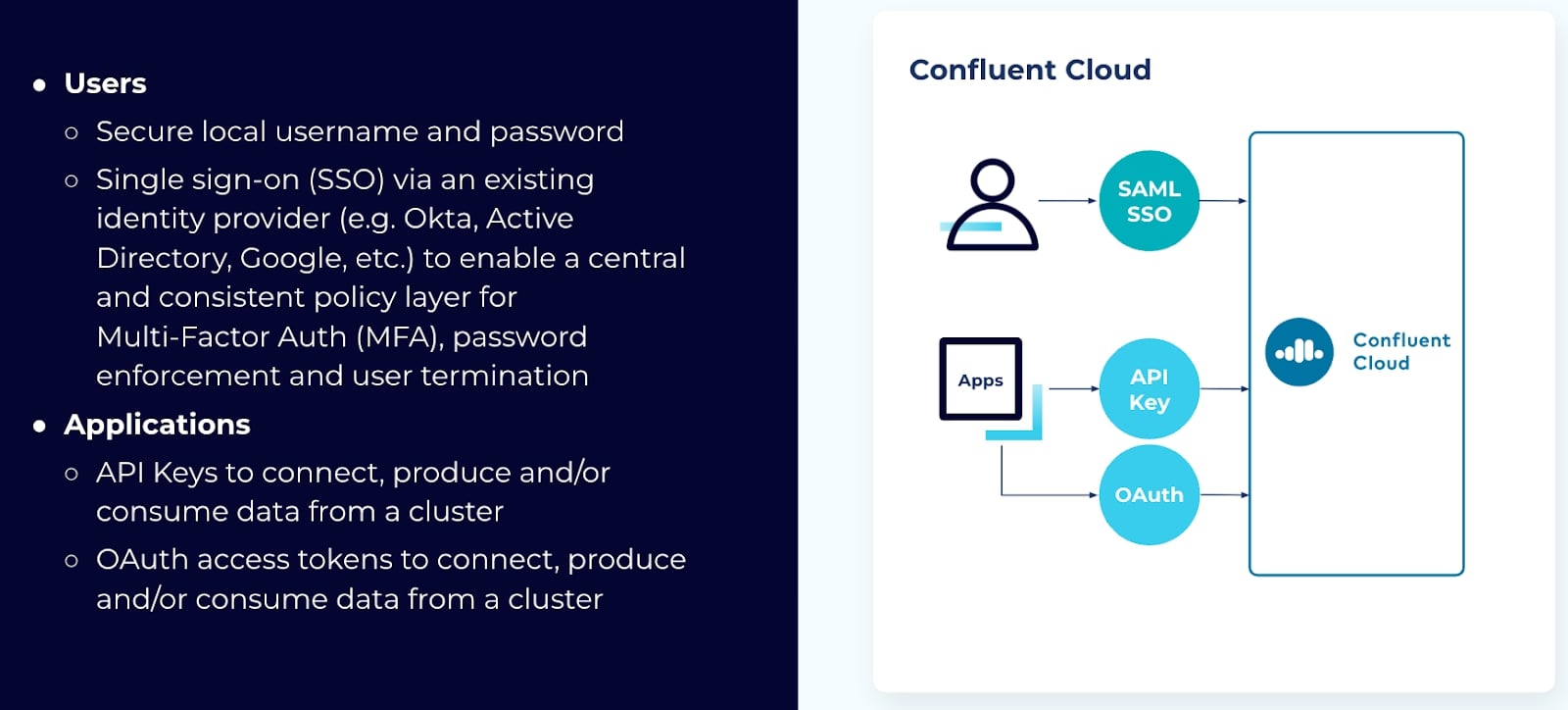
You are probably already familiar with SSO and have used identity providers (IPs) such as Okta, Active Directory, or Google accounts for authentication. The benefit of SSO is that it enables a central and consistent policy layer for multi-factor authentication (MFA), password enforcement, and terminating user access. The only requirement for this method is that your IP must use Security Assertion Markup Language (SAML).
For authenticating applications or services, there are two options: API keys or connecting your applications via OAuth.
You can get an API key through the Confluent CLI or the web interface. Each API key consists of a key and secret. There are two types of API keys you can use:
- Resource-specific keys
- Cloud API keys
Resource-specific API keys give access to individual resources in a particular environment. An environment is a collection of Kafka clusters and deployed components such as Connect, ksqlDB, and Schema Registry. An organization can contain multiple environments. You may have different environments for different departments or teams, for example, all belonging to the same organization.
The second type of API keys, Cloud API keys, grant management access to the entire organization's Confluent Cloud instance, including all environments.
If you plan on using API keys, keep in mind:
-
You should only use service accounts in production - API keys for Confluent Cloud can be created with user accounts or service accounts. A service account provides an identity for an application or service that needs to perform programmatic operations within Confluent Cloud. When moving to production, ensure that only service account API keys are used. Avoid user account API keys, except for development and testing. If a user leaves, changes departments, or their account is deleted, all API keys created with that user account are deleted and your applications will stop working. For this reason, we recommend creating a policy of only using service accounts for your applications and services, even in development and testing stages.
-
You should manage and delete unneeded keys and service accounts - As a standard practice of your security strategy, you should regularly review and clean up your existing API keys and service accounts. To better understand which API keys are being used, you can review and monitor authorization and authentication events in your audit logs. To list the API keys that you currently have, run the confluent api-key list command. Use the --service-account option to list only the API keys associated with the specific service account.
-
You should rotate your API keys regularly - Access to your Confluent Cloud resources is controlled by API keys associated with service accounts, which have controls that determine what the service account has access to. API keys can be created and destroyed without affecting the service account ACLs and RBAC role bindings. Rotating API keys is a good security practice that limits the potential impact of an API key that is leaked.
When you rotate API keys, it is recommended you perform the steps in the following order:
- Create a new API key.
- Update the resource or application to use your newly created API key.
- Verify the connection via your audit logs.
- Delete the old API key.
Always make sure to use audit logs to track the usage of API keys.
As previously mentioned, OAuth is the other way to provide access to your applications and services.
OAuth allows you to access your resources and data without having to share or store user credentials. It’s built off cryptographically signed access tokens that allow your application or service to authenticate.
There are a few advantages to using OAuth for authentication:
- OAuth is a cloud-native authentication solution. Most companies already employ an OAuth solution for other cloud resources they use for authentication/identity management.
- OAuth provides centralized identity management. This is advantageous because system administrators have only one place to manage authentication for all their systems rather than having to create and manage credentials, or set up a sync system, for each independent service in their organization.
OAuth is an industry standard for providing authentication. If your organization provides a large number of service accounts, or there are a large number of applications accessing Confluent Cloud, you may run out of API keys. OAuth allows you to scale to thousands of identities and credentials, making sure that your applications only have the access they are supposed to have.
OAuth uses identity pools to map groups of identities to your role-based access control or access control list (ACL) policies. For example, let’s say you have a group of applications that all need access to the same cluster or Kafka topic. Rather than giving each application individual access, or controlling access on a per-application basis, you can create an identity pool, and use an identity pool filter to map each application identity to this identity pool. Then, using RBAC or ACL policies you can control permissions for the pool.
There are a few things to keep in mind if you plan to use OAuth:
- You can use OAuth with Apache 3.2.1, Confluent Platform 7.2.1 and 7.1.3 and later, and librdkafka 1.9.2 or later.
- You will need to upgrade any older or legacy clients that don’t support OAuth. While most applications or services have support built in, you may have some legacy systems that will need to be upgraded, or which may require you to use API keys.
- You should group clients into identity pools when possible. If you come from using API keys, your first inclination might be to create identity pools for each service account. While this is possible, take some time to really look at your clients and see if there are groups that you can combine and control with one RBAC or ACL policy.
Whether you use API keys or OAuth, we highly recommend using RBAC for authorization, something that we’ll look at in the next module.
API Keys vs Service Accounts
Service account API keys are recommended for production and automation, while user API keys are best suited for development and personal use. Service account API keys ensure continuity and security for applications, whereas user API keys are tied to individual users and can cause disruptions if the user leaves the organization.
Manage API keys in Confluent Cloud | Confluent Documentation
Best practices for API keys in Confluent Cloud | Confluent Documentation
Cloud API Keys vs. Resource-Specific API Keys in Confluent Cloud
In Confluent Cloud, the primary difference lies in the scope of access they provide: Resource-specific API keys grant granular access to a particular resource within an environment, while Cloud API keys grant broad management access to the entire Confluent Cloud organization.
Cloud API Keys
- Scope: Provide management access to all resources within your entire Confluent Cloud organization, across all environments.
- Use Cases: Primarily used for administrative and control plane operations, such as provisioning and managing Confluent Cloud resources (e.g., creating clusters, managing service accounts, accessing the Metrics API) using the Confluent Cloud APIs or CLI.
- Permissions: Permissions are inherited from the associated user or service account and apply organization-wide based on their Role-Based Access Control (RBAC) roles.
- Security: Due to their broad access, these keys require careful management and are generally recommended for specific administrative integrations, not for data plane operations (like producing/consuming Kafka messages).
Resource-Specific API Keys
- Scope: Provide granular access to individual data plane resources within a specific environment, such as a particular Kafka cluster, Schema Registry, ksqlDB cluster, or Flink region.
- Use Cases: Ideal for application-specific authentication, such as allowing a client application to produce or consume data from a specific Kafka topic, or connecting a third-party service like Datadog to the Metrics API for a specific resource.
- Permissions: Access is limited to the specific resource for which the key was created. You typically use access control lists (ACLs) to further refine permissions on granular Kafka resources (e.g., specific topics or consumer groups).
- Security: Following the principle of least privilege, these keys are the recommended approach for production applications because they limit the blast radius in case of a credential leak.
Summary of Differences
| Feature | Cloud API Keys | Resource-Specific API Keys |
|---|---|---|
| Scope of Access | Entire Confluent Cloud organization (all environments) | Specific resource (Kafka cluster, Schema Registry, etc.) within an environment |
| Primary Use | Resource management, provisioning, organizational metrics | Data plane access (produce/consume Kafka data), application authentication |
| RBAC/ACLs | Permissions based on organization-level RBAC roles | Permissions based on resource-level RBAC and fine-grained ACLs |
| Recommendation | Use for administrative tasks | Use for production applications and services |
For production use, the best practice is to use resource-specific API keys associated with dedicated service accounts to minimize security risks and align with the principle of least privilege. You can manage these keys via the Confluent Cloud Console, the Confluent CLI, or the Confluent Cloud APIs.
Global API Keys
Global API keys simplify authentication across these Confluent Cloud resources:
- Cloud Management API
- Kafka clusters Enterprise and Freight (currently private only) Dedicated clusters (public and private)
- Schema Registry (private networking)
- Tableflow
- Flink
- ksqlDB
With global API keys, you can streamline your development workflow whether you’re building new applications, managing infrastructure with Terraform, or implementing multi-cluster failover scenarios.
Note
A global API key can be used across Confluent Cloud services, but it does not grant any permissions by itself. Whether the key is authorized to perform a given operation depends entirely on the RBAC roles and ACLs assigned to the principal (user account or service account) that owns the key. Before using a global API key, ensure the owning principal has the appropriate permissions for each resource it needs to access.
To reduce the scope of a global API key, create separate service accounts with only the permissions required for each use case, and create a global API key for each service account. For details, see Service Accounts on Confluent Cloud.
Each user account or service account can create only two global API keys. When only accessing a specific Confluent resource, use resource-scoped keys.
Use a global API key when
- Your application accesses more than one Confluent Cloud resource type. For example, a service that reads from Kafka and queries Flink, or writes to Kafka and validates schemas against Schema Registry.
- You are managing infrastructure with Terraform and want a single credential to configure the
confluentprovider across all resource types. - You are implementing multi-cluster failover and need the same key to work across multiple Kafka clusters without reconfiguration.
- You are an admin running organization-wide workflows (for example, provisioning environments, clusters, and ACLs) and want to avoid juggling separate Cloud management and data-plane keys.
- You are getting started with Confluent Cloud development and want to minimize the number of credentials to manage.