Costs
- Aurora Serverless V1
- Aurora Serverless V2
- Aurora IO Optimized MySQL
- Aurora MySQL - AWS Pricing Calculator
- RDS MySQL
- MySQL on EC2 (self managed)
- Aurora Limitless
- Aurora Global Database
Aurora vs RDS Costs
Type
-
Storage - 2TB
-
Baseline IO - 30 per second
-
Peak IO rate - 300 per second
-
Duration of peak IO activity - 360 hours per month
-
General Purpose - db.t4g, db.m7g, m6g, m6i, m5
-
Memory Optimized - db.r7g
AWS Pricing Calculator - Comparison
- Aurora MySQL
- db.r6g.xlarge - 751.04 USD
- db.r6g.large - 534.96 USD
- IO Costs extra
- Amazon RDS for MySQL
- db.r6g.xlarge - 1,242.49 USD
- 1x storage backup costs included
- Aurora Serverless v2
- 3 ACU - 713.81 USD
- 10 ACU - 1,633.61 USD
- EC2 m7g.xlarge
- 609.39 USD with EC2 Instance Savings Plans
- m5a.xlarge - 634.21 USD with On demand
- Backup Costs extra
- Aurora IO Optimized
- db.r6g.xlarge - 1,068.54 USD
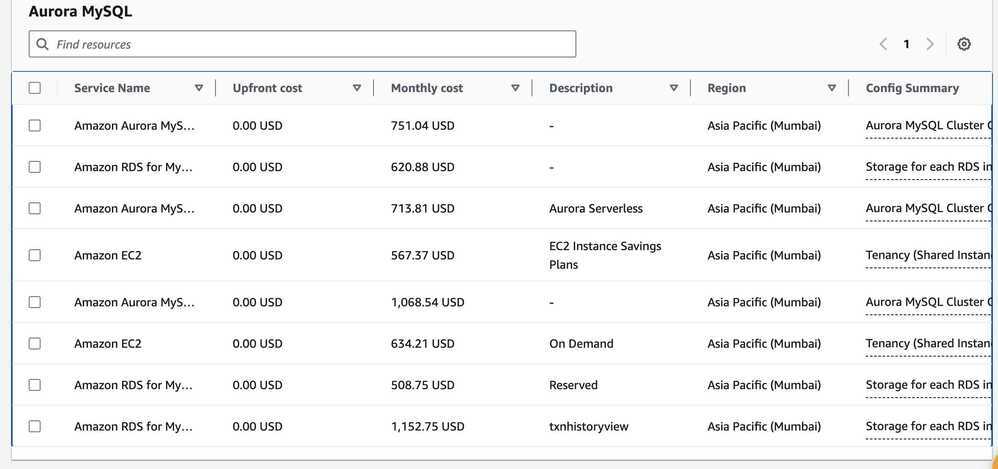
Instances Cost
- db.m5.xlarge (4,16) - $351.86 - db.m5.xlarge pricing and specs - Vantage
- db.t4g.xlarge (4,16) - $243.82 - db.t4g.xlarge pricing and specs - Vantage
- db.m6g.xlarge (4,16) - $312.44 - db.m6g.xlarge pricing and specs - Vantage
- db.m7g.xlarge (4,16) - $349.67 - db.m7g.xlarge pricing and specs - Vantage
- db.r6g.xlarge (4,32) - $352.59 - db.r6g.xlarge pricing and specs - Vantage
- db.r7g.xlarge (4,32) - $397.12 - db.r7g.xlarge pricing and specs - Vantage
- Amazon EC2 R6g Instances are powered by Arm-based AWS Graviton2 processors.
- Amazon EC2 R7g instances are powered by Arm-based AWS Graviton3 processors.
- Migrating to Graviton3-based instances provide up to a 30% performance improvement and up to a 27% price/performance improvement over Graviton2-based instances on RDS
- Amazon RDS now supports AWS Graviton3-based M7g and R7g database instances | AWS re:Post
- Amazon RDS now supports M7g and R7g database instances
Choosing Instance type
Amazon RDS provides the flexibility to choose the instance type you need for your database workloads. Each instance type supports a certain number of CPUs, memory, EBS bandwidth, and network performance. The application owner should choose the instance type based on workload requirements. For example, for CPU-intensive workloads, an M family instance is better suited, whereas for a memory-intensive workload, the R family is better. As discussed in the previous section, you should only change instance types after carefully looking at your requirements. Because the majority of database workloads are memory intensive, you should evaluate using the latest offering in R and X family instances. For more information, see Amazon RDS Instance Types.
- Everything You Need to Know About AWS RDS Instance Types
- The Ultimate RDS Instance Types Guide (2024 UPDATE)
- DB instance classes - Amazon Relational Database Service
Aurora vs RDS MySQL
- https://www.percona.com/blog/2018/07/17/when-should-i-use-amazon-aurora-and-when-should-i-use-rds-mysql
- https://www.actifio.com/company/blog/post/comparing-aws-rds-for-aurora-vs-mysql-vs-postgresql
- AWS — Difference between Amazon Aurora and Amazon RDS | by Ashish Patel | Awesome Cloud | Medium
- Aurora’s unique architecture gives you more durability, scalability, resiliency, and performance when compared to RDS. Although there is a small increase in cost, it is recommend using Aurora for enterprise-level applications. If you are looking for a native high availability solution and/or read-intensive workload, then Aurora is a perfect match.
- Aurora vs RDS: How to Choose the Right AWS Database Solution
- AWS RDS MySQL vs. Aurora MySQL - House of Brick
Migration
How can we move our cluster from aurora to RDS in efficient and fast way?
- Create a Read Replica of your Aurora cluster as an RDS MySQL instance
- Enable the "Multi-AZ deployment" option to create a standby instance in a different Availability Zone
- Promote the RDS MySQL Read Replica to be a standalone instance
- Point your applications to the new RDS MySQL instance
RDS to Aurora Migration
Feature that allows you to migrate from an Amazon RDS DB Instance for MySQL to Amazon Aurora by creating an Aurora Read Replica. The migration process begins by creating a DB snapshot of the existing DB Instance and then using it as the basis for a fresh Aurora Read Replica. After the replica has been set up, replication is used to bring it up to date with respect to the source. Once the replication lag drops to 0, the replication is complete. At this point, you can make the Aurora Read Replica into a standalone Aurora DB cluster and point your client applications at it.
New – Create an Amazon Aurora Read Replica from an RDS MySQL DB Instance | AWS News Blog
Costs
When making read replica decisions, consider the following criteria:
- If primary instance utilization for I/O and CPU usage is under 30% constantly, don’t spin up a read replica.
- If the CPU and I/O capacity of the read replica is under 30% constantly, explore the possibility of using a smaller instance size. If the primary instance has capacity, you can also consider transferring the load to the primary and shut down the read replica.
Memory
Available RDS instance memory is essential for database performance, but the decision to downsize can’t be based on memory utilization. This is because a significant part of the instance memory is allocated for internal database buffers (SGA in Oracle, Shared Buffers in Auroa PostgreSQL). Due to this, even an idle RDS Oracle instance may show 70% of memory used even though there are no connections. Similarly, in Aurora PostgreSQL, shared_buffers is configured to use around 75% of the available memory by default, so even an idle instance shows used memory.
The database engines rely on available memory to cache data blocks. This cached data helps speed up queries. If your application needs to meet a specific low-latency SLA for queries, downgrading the instance type can have an impact. For example, when you downsize from db.r4.4xlarge to db.r4.2xlarge, the available memory drops from 122 GB to 61 GB. This results in a smaller cache for the database, therefore the database engine needs to read more pages from the storage. Because a fetch from storage is slower than the cache fetch, query time may increase. Also note that with a smaller cache, the storage I/O increases due to which application may need more IOPS. It’s important for application owners to evalutate the impact on latency-sensitive applications before downsizing the instances in production. In Amazon Aurora you pay for the IOs your database consumes therefore IO cost impact should also be analyzed before deciding to downgrade the instance type.
| Environments | RDS Instance Stats | Action | |
|---|---|---|---|
| Read Replica | All | CPU utilization < 30% and I/O throughput < 30% | Transfer load to primary and shut down or downsize. |
| Under-utilized Instances | Production | No connections for 1 month , CPU utilization < 5% and I/O throughput < 5% | Alert the owner and escalate if no action is taken within a given time window. |
| Under-utilized Instances | Non-Production | No connections for 1 month , CPU utilization < 5% and I/O throughput < 5% | Alert the owner and escalate if no action is taken within a given time window. Take a snapshot and shut down if no action is taken within the given time. |
| Right-size Instances | Production | CPU utilization < 30% and I/O throughput < 30% | Alert the owner and escalate if no action is taken within a given time window. |
| Right-size Instances | Non-Production | CPU utilization < 50% and I/O throughput < 50% | Alert the owner and escalate if no action is taken within a given time window. Take a snapshot and downsize if no action is taken within the given time. |
Optimizing costs in Amazon RDS | AWS Database Blog
Storage Optimization
- Run OPTIMIZE TABLE
- Reduce application table storage
- Reduce binary log storage
- Reduce or turn off general log and slow query log storage
- Manage or reduce InnoDB system tablespace size
Optimize disk storage when Amazon RDS for MySQL uses more storage than expected | AWS re:Post